
The Custom eLearning Buyer's Guide
19 min read

So often, leaders have a vision for what they want to achieve through delivering impactful, well-designed training, but they lack the resources for how to achieve it.
That’s why we’re happy you’re here.
Custom course creation is one of our most popular services. We work with hundreds of organizations across all industries to help their training vision come to life.
More about us later! Let’s talk about you.There are a lot of considerations that go into developing impactful training. Let’s look at some of the most common questions people have.
What are your training goals?
What are your desired outcomes?
The better you understand your goals, the better you'll be able to decide where to invest in your course build.
If reducing forklift incidents is a key goal of your forklift course, then investing in interactive role-playing scenarios could be a huge benefit to achieving that goal.
You’re considering investing in building a course to help you…
- Decreased compliance risk?
- Improve employee or client retention through better onboarding?
- Upskill or reskill your employees to improve productivity?
- Improve health and safety training to reduce workplace incidents?
- Reduce call handle time or improve troubleshooting skills?
- Increase sales by enhancing selling skills or product knowledge?
- Reduce travel costs by moving to online delivery?
- Sell courses to the public or your clients?
- Or something else entirely?
How will your success be measured?
Achieving your goals often take months or longer to achieve, so you’ll want to have leading indicators of success.
If you’re delivering compliance training, a leading indicator of success may be:
- Course completions
- 1st quiz attempt passing rate
- Comparing pre-test and post-test scores
- Measurable knowledge lift
By identifying the leading indicators of success, you’ll be able to know earlier if you’re on track to achieve your actual desired outcomes.
Who are your learners?
What’s your relationship with your learners?
Would you write an email the same way to clients as you would for employees? Probably not, and it’s the same for your courses. When writing for employees, you’ll want to flavor it with your culture. For clients, you want to express your brand.
Here are some ways you may want to tweak your content based on your audience:
| Aspect of the course | developing for employees | developing for clients |
|---|---|---|
| Content | Job-specific skills and knowledge | Industry-specific skills and knowledge |
| Tone | Professional and formal | Professional and friendly |
| Language | Industry-specific jargon and terminology | Industry-specific jargon and terminology (if applicable) |
| Design | May incorporate branding and company culture | May incorporate client branding and culture |
| Assessment | May be tied to job performance and evaluated by management | May be evaluated by the client or used for professional development |
Developing content with the right tone, and references will help it feel more natural to your learners. Less cognitive load for your learners means it’ll be easier to digest and more likely to be understood and remembered.
What is their foundational knowledge?
Your desired outcome will only be achieved if your learners remember, understand, and align with your training content. It’s really important to make sure you understand what your learners already know about the subject matter, so you can design the course at the right level.
Here’s what you’d ideally want to know:
- Do they know the terms you are referencing? If a learner doesn’t already understand a term, they can easily get lost. Novice learners appreciate glossaries, definitions, and explanations. If your learners are more advanced, then excessive definitions could actually distract and annoy them.
- What are their knowledge gaps? If you know that learners have a tough time understanding certain concepts, then focusing on those with richer interactions (e.g., video or interactive diagrams) can help ease their comprehension.
| Novice learners | experienced learners | |
|---|---|---|
| Level of experience | Are new to the subject matter and may have limited foundational knowledge | Have a strong command of the subject matter and want to learn more advanced concepts |
| Level of knowledge | Start with the basics by introducing foundational concepts and terminology without overwhelming the learner with too much information at once | Build on existing knowledge by reviewing what the learner already knows and then moving on to new information |
| Language level & tone | Use clear and concise language and analogies that avoid technical jargon or complex language to explain new ideas | Use more advanced, technical language and advanced terminology |
| Learning path | Use scaffolding to break down complex tasks or concepts into smaller steps, providing feedback/guidance as the learner progresses | Encourage independent exploration by providing the learner opportunities to dig deeper and explore related topics on their own |
| Enriched content | Use visual aids such as diagrams, charts, and videos, as well as interactive exercises and quizzes | Provide real-world examples using case studies to demonstrate how the concepts apply in real life |
Overall, understanding a learner's foundational knowledge is critical to designing an effective learning experience that meets the learner's needs, builds on their existing knowledge, and helps them achieve their learning goals.
How familiar are your learners with eLearning?
Imagine that you are teaching two people how to change a tire. One is a new driver who has never changed a tire before. The other is an experienced driver who has changed dozens of tires, but not for this specific kind of vehicle. Your instructions would be different based on the experience of each person.
The novice needs to learn where to find the jack and the spare and how to raise the car safely, remove the lug nuts, place the spare on the axle, tighten the lugnuts, lower the car, and put away the jack and old tire.
The other driver just needs to know the location of the spare and the jack, and they can take it from there.
It’s the same with learners and your eLearning content. If your learners are new to eLearning, you might need to provide more prompts, tooltips, resources, and much more explicit directions. That kind of granular step-by-step instruction might annoy a more experienced learner who simply doesn’t need that kind of assistance.
Here’s what to consider for your two main types of learners.
| Consideration | Novice Learners | Experienced Learners |
|---|---|---|
| Interface Design | Simple, easy-to-use interface with clear navigation | More complex interface with additional features |
| User Guidance | Clear, step-by-step instructions and tutorials | Less guidance is needed, and more emphasis on exploration and discovery |
| Course Navigation | Linear navigation with limited branching | Non-linear navigation with branching paths and options |
| Interactivity | Interactivity is used selectively and only where it adds value | More interactivity to keep the user engaged and interested in more complex content |
| Learning Objectives | Clearly defined learning objectives with detailed explanations | Less emphasis on learning objectives, and more emphasis on practical application |
| Assessment | Frequent assessment with immediate feedback to reinforce learning | Assessments are used more sparingly, with less feedback and a focus on the application |
| Content | More detailed explanations and background information | Concise and to-the-point information that assumes some prior knowledge |
| Media | More use of multimedia, such as videos and animations | Less emphasis on multimedia, and more emphasis on text and graphics |

What sized screen will your learners be using?
You want your learners to be in the right frame of mind for learning. You definitely don’t want them to be frustrated.
Imagine that you’re doing product training, and you design a beautiful interactive diagram showing how one of your products works. It’s fantastic. Very detailed and gorgeous.
Now, imagine that 70% of your learners are accessing your course on their mobile devices, and the touch points in the interactive video are so close together that instead of your learners having this wonderful learning experience, they are frustrated by continuously hitting the wrong hotspot!
They won’t be in the right frame of mind to learn anything, and you may have to spend a lot of time chasing them to complete the content.
This can be avoided by considering the following:
- What size screen will they be using?
- Will they be using a touch device like a phone?
- Will they be on limited bandwidth?

In addition to those considerations, if many of your learners will be accessing your content on a small screen, you should:
- Design content in bite-sized segments that are easier to digest while the learner is mobile. Learners generally prefer to complete a section, so having more sections for mobile learners allows them to progress through your content a few minutes at a time.
- Leverage the principles of responsive design, where the elements of the screen rearrange themselves to better fit on a mobile device. Some authoring software simply shrinks down the full-sized version for a mobile view, which just makes everything harder to read or interact with.
If you know your learners, you can better craft a learning experience that will engage them. The better engaged they are, the more likely they will retain your material and the more likely you are to achieve your desired outcomes.
Do you already have your source content?
How ready is your existing content?
There are generally five levels of content readiness, from content only existing within a subject matter expert’s (SME) head to a previous course that just needs to be tweaked.

Nothing is ready
You have no training assets at hand. It’s all in someone’s head.
Raw content
Documents, slides, videos, or instructor-led training (ILT) content that need to be organized and refined for eLearning.
Draft content
Slide decks of past training sessions (with accompanying instructor-led training), training manuals, binders, or other “book-form” content. Provided draft content that needs to be edited and optimized for eLearning. The instructional designer may need to work with the client to clarify learning objectives and revise the content accordingly.
Appropriate slides
All the information is there, already broken into appropriate slides, and generally requires editing and recommendations.
Existing course
An existing eLearning course.
Do you need to interview subject matter experts? (SMEs)
Regardless of your content readiness level, it's likely that you'll need to update your content to make sure it remains relevant and effective.
Your “SMEs” are the people who have a wealth of knowledge in their heads, and the quality of your courses depends on that knowledge being captured, compiled, and converted into course material.
- Have you identified the internal and possibly external resources that you, or someone, will need to interview to fill content gaps?
- If there is a large number of SMEs to interview, with each having their own scheduling constraints, will you be able to adequately schedule interviewing time with them all?
- Subject matter experts may be resistant to changes in the way that content is presented or delivered. How will you handle them having different ideas about how the course should be taught, which may conflict with your business goals or desired outcomes?
- Subject matter experts may not have experience in designing or delivering training. How can you help them understand the needs of the target audience or the requirements for creating effective training modules?
Neovation’s team loves to talk to SMEs and is able to drill down into the core information needed to build your courses.
How should your course be built?
What authoring tool should your course be built in?
Now that you’ve given some thought to your training goals and how your learners will be taking their training, it’s time to consider what the best course-creation tools will be for your eLearning project.
The choice of authoring tools will impact your learners, as it determines how they will access training and the types of interactivities that can be included, as well as how easy your course will be to create.
Another consideration is updating your course. If you are going to be updating your courses frequently, you will want to build it in a way that makes frequent editing easy.
If your content is more evergreen, then a less-editable, more “high-gloss” approach may make sense, one that includes animations or simulations, which are more expensive and difficult to update.
Let’s start here:
| Positives | Challenges | |
|---|---|---|
| Rapid course authoring tools | Fast course building | Lack of options or sophisticated interactivities |
| Advanced course authoring tools | Create interactive and multimedia-rich courses that can include branching, gamification, or simulations | Requires a certain level of technical and creative expertise |
| Custom course authoring tools | Offers advanced customization and flexibility based on your specific needs | Cost and dedicated skillset to maximize your investment |
There are many authoring tools, each with a specific strength. Likely, you’ll need more than one!
| If you want to create... | Authoring tools to try... |
|---|---|
| Interactive tutorials | Articulate Storyline, iSpring Suite |
| Corporate training courses | SmarterU, Moodle, D2L |
| Webinars and virtual classrooms | Zoom, Webex |
| Video lectures | YouTube, Vimeo, CapCut, Adobe Premiere Pro |
| Simulation-based training | iSpring Suite, Articulate Storyline |
| Self-paced modules | SmarterU, Moodle, Rise 360 |
| Quizzes and assessments | SmarterU, Moodle, Rise 360 |
| Gamified learning | Articulate Storyline, OttoLearn, H5P, Quizlet |
| Audio recordings and podcasts | Audacity, GarageBand, Adobe Audition |
| PDFs, ebooks, and other downloadable materials | Adobe Acrobat, Pressbooks |
| Social learning platforms | LinkedIn Learning, Coursera, Udemy |
| Augmented Reality (AR) and Virtual Reality (VR) based learning* | Unity, Unreal Engine, Vuforia |
| Microlearning | OttoLearn, Quizlet |
What type of components should be used within my module?
Choosing eLearning interactions is like a chef preparing a feast.
Just as a chef has a wide range of ingredients to choose from, you have a variety of eLearning interactions at your disposal.
But, just as a chef carefully selects the ingredients that will complement each other and create a cohesive and delicious dish, you must carefully choose the eLearning interactions that will enhance the learning experience and support the learning objectives of the course.
It's not about throwing in as many interactions as possible but rather selecting the ones that will create a meaningful and effective learning experience for the learner, just as a chef selects the right ingredients to create a memorable dining experience for their guests.
Common media and interactions types include:
| Component Type | Use this component type to... |
|---|---|
| Text-based readings | Deliver theoretical concepts, explain procedures, and present technical information. |
| Images, diagrams, and charts | Illustrate concepts, provide visual aids, and present complex information in a simplified manner. |
| Video, either narrated or silent, and can be interactive | Demonstrate practical skills, model behaviors, and provide learners with examples of real-world scenarios. |
| Audio files | Provide narration or background music, present information in an engaging manner, and accommodate learners with visual impairments. |
| Animations | Simplify complex ideas, visualize processes, and break down complicated concepts into smaller parts. |
| Technical simulations and scenarios | Provide learners with opportunities to practice their skills in a safe and controlled environment and give them feedback. |
| Learning games | Engage learners, enhance their motivation, and reinforce learning objectives in an interactive and fun way. |
| Knowledge checks for retention training | Enhance retention of important information, reinforce key concepts, and test learners' understanding. |
| Quizzes | Provide learners with opportunities to assess their understanding, identify knowledge gaps, and give them immediate feedback. |
| Tests and exams, either machine-graded or human-graded | Assess learners' knowledge and understanding of the material, measure the effectiveness of the course, and provide learners with a sense of accomplishment. |
How should your courses look and feel?
Does how pretty a learning module is, have an impact on the learner’s experience? Yes, but not in the way you may think.
Learners will be most impacted by a number of design issues, such as:
| Common Issues | How the issue impacts the learner |
|---|---|
| Inconsistent branding | The course design may not be consistent with the organization's branding, leading to confusion or a lack of professionalism. |
| Poor navigation | The course may be difficult to navigate, leading to frustration or disengagement from the learner. |
| Overuse of text | Can overwhelm the learner and lead to cognitive overload, reducing the effectiveness of the course. |
| A lack of visuals | Can make the course less engaging and less memorable for the learner. |
| A cluttered layout | Can make it difficult for the learner to focus on the most important information and may detract from the overall design of the course. |
| Poor color contrast | Can make the content difficult to read, especially for learners with visual impairments. |
| Inappropriate font size | An inappropriate font size can make the content difficult to read, especially on smaller devices. |
| Inconsistent use of multimedia | Can make the course feel disjointed and detract from the overall learning experience. |
| Inaccessible content | Provide learners with opportunities to assess their understanding, identify knowledge gaps, and give them immediate feedback. |
| Tests and exams, either machine-graded or human-graded | Can exclude learners with disabilities or impair the effectiveness of the course for all learners. |

Should you design your module to be accessible?
Do you watch videos with subtitles on? You are part of the 80% of viewers who watch videos with subtitles, and not because of hearing deficiency!
Subtitle use has increased in the last decade for a couple of reasons. More and more, people are using mobile devices in public settings, and they don’t want to disturb others.
This can also be true both at home and in the office. And reading the text that you hear increases comprehension and retention! Double win!
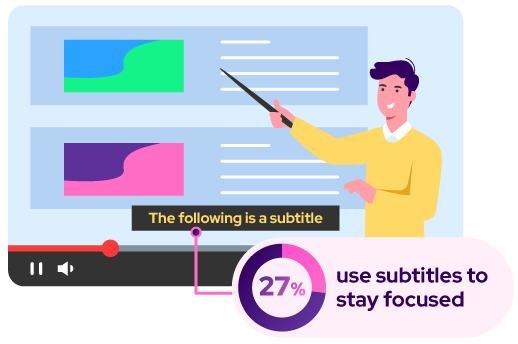
And in case you were wondering, the largest demographic of viewers who use subtitles are aged 18-25 when watching TV programming on any device. 27% of viewers said subtitles help keep them focused on what they're watching.
Accessibility is an increasingly important consideration when designing an eLearning course.
Historically it was a consideration mainly when it was legislated, but increasingly there is recognition that general principles of accessibility, including having tooltips, proper heading levels, and video transcription, lead to better learning outcomes.
| Consideration | Why you should consider it |
|---|---|
| Legal compliance | Many jurisdictions have accessibility laws such as the Americans with Disabilities Act (ADA) in the United States and the Accessibility for Ontarians with Disabilities Act (AODA) in Ontario, Canada. Failing to make eLearning courses accessible can result in legal action and penalties. |
| Inclusivity | Making eLearning courses accessible is the right thing to do, as it ensures that everyone has an equal opportunity to learn and succeed, regardless of their abilities. It also demonstrates a commitment to diversity, equity, and inclusion. |
| Improved learning outcomes | Accessible courses are also more likely to be engaging and user-friendly, leading to increased retention and better transfer of learning to the job. A great example is that there is a 10% lift in content retention when video subtitles are added. |
Accessibility levels in eLearning use a framework called the Web Content Accessibility Guidelines (WCAG). There are three levels A, AA, and AAA. Typically if a module is designed to meet the AA requirements, then they are considered accessible and would meet most regulatory requirements.
| Example Requirement | Level A | Level AA | Level AAA |
|---|---|---|---|
| Text alternatives for non-text content | ✓ | ✓ | ✓ |
| Keyboard accessibility | ✓ | ✓ | ✓ |
| Time-based media alternatives | ✓ | ✓ | |
| Contrast ratio for text | ✓ | ✓ | |
| Sign language interpretation | ✓ |
Designing courses to be accessible does add some time to a project, but it helps you future-proof your module, and if it leads to better learning outcomes, then it can actually enhance your project ROI.
How will your courses be delivered?
Typically courses will either be delivered through an LMS (Learning Management System), or by posting on a website.
If your course is being delivered to an LMS, you need to consider what format to export the course in. Each format has different features and benefits, and some learning systems can only support some of them.
| Feature | ScoRm 1.2 | Scorm 2004 | Aicc | xAPI |
|---|---|---|---|---|
| Tracking and reporting | Course completion status, score, and time spent on the course. | Same as SCORM 1.2 with more advanced tracking data. | Same as SCORM 1.2 | More advanced tracking data (cross-platform learning experiences, a wider range of learning activities.) |
| Learning analytics | Limited learning analytics capabilities. | Same as SCORM 1.2 with more advanced learning analytics capabilities | Same as SCORM 1.2 | More advanced learning analytics capabilities (the ability to track a wider range of learning activities and experiences) across multiple devices and platforms. |
| Advanced features | Limited advanced features compared to SCORM 2004 and xAPI. | More advanced features (the ability to handle complex learning activities and adaptive learning.) | Same as SCORM 1.2 | More advanced features (the ability to track real-world experiences and non-linear learning paths.) |
Neovation team of dedicated eLearning development professionals has a robust toolkit and deep bench strength to bring all the resources you need to the content-building process.
How much would your course cost to build?
Do you have an in-house team to build your modules?
Keeping in mind the considerations we’ve discussed, do you have the resources with the available time and energy to tackle this project?
Here’s a checklist to help decide:
- Does your team have the expertise and proficiency with using the various authoring tools that are available?
- Can they create interactivities, animations, and simulations, if needed, to ensure your course meets your learners' needs? What about video and audio editing?
- Do you have a process in place to capture the knowledge needed to build the courses your learners need? Does your team have experience interviewing SMEs?
- Do you have experience building storyboards and turning them into interactive, engaging learning experiences?
- Have you created courses for upload into an LMS platform? What about quality assurance testing, both for the course content, to make sure it is correct, and the course build itself, to make sure that it works as expected when launched in your training software?
If your course creation needs exceed your current team’s capacity, either due to time, resources, or skills, you may need to bring in outside help.
Should you hire a freelancer, an offshore company, or a local instructional design studio?
There are benefits and drawbacks to each.
| Thinking of hiring a… | The Positive | Potential Challenges | Cost Factors |
|---|---|---|---|
| Freelancer | Temporary fractional team member with a needed skillset for a limited engagement. | Conflicting client priorities may jeopardize your deadlines. | Usually, 2X the cost of your most experienced team member (ballpark). |
| Off-shore company | Promises fast response time and the lowest prices. | May be issues around quality control and communication (time zone difference). | Corrections, revisions, etc., may add significantly to the time and cost. |
| Local design studio | Experienced team with a history of successful projects for a variety of clients/industries. | Need to follow standard processes that may be new to your organization. | Higher costs are offset by quality output and smooth project management to meet deadlines. |

TIP: To find a design agency, we recommend doing an online search for phrases like “Custom eLearning Development,” “Instructional Design Services,” “Online Course Development,” or similar key phrases.
How should you evaluate and hire a design studio?
Here’s how to measure the quality of a good design studio right from your first impression.
How to evaluate instructional design companies beforereceiving a quote or proposal:
- Look at their website, online portfolio, blog, and testimonials to get an initial impression.
- Narrow down your search to six companies and book a meeting with each to learn more about how they would handle your specific project.
- Ensure that your initial inquiry is responded to promptly and professionally.
- Attend an initial meeting (Discovery Call) to learn about the potential vendor and their understanding of your project.
- Answer specific questions about your training objectives, course materials, delivery methods, and timeline.
- Evaluate the vendor’s ability to meet you where you need them with delivery of specific services related to your project.
- Confirm if they will provide you with the project source files at the end of the project.
- Identify the top three vendor candidates and request comparative quotes.
How to evaluate instructional design companies afterreceiving a quote or proposal:
- Review written proposals that outlines the vendor’s understanding of your project, timeline, quote, and how they’ll handle scope changes during the project (there will definitely be scope changes!)
- Use a comparative grid to objectively measure each company's responses and promises.
- Negotiate as needed to finalize project details, including changes to your vision, budget, or timeline.
- Sign the agreement and attend a project kick-off meeting to transition to your project manager, who is responsible for delivering your course on time and on budget.
What factors will impact your course cost?
Your custom course creation will depend on many factors:

| Existing eLearning content | The condition of your existing source material will determine how much work is required for us to prepare your storyboards, which may increase or decrease your project scope. |
| Custom media elements | Adding videos, animations, and diagrams have a significant impact on cost. |
| Interactivity | Simulations and games will require more development time and resources. |
| Authoring tool | Some tools take longer to build in than others. |
| Translation and localization | This will depend on the number of languages required and the extent of the localization necessary. |
| Accessibility | Depending on the elements involved, this may add time to your project or require additional quality assurance testing. |
| Project management | This will depend on the complexity of the project and the amount of coordination required between the various stakeholders. |
| Timeline | Rushed projects often require additional resources, which can drive up the overall cost. |
| Review and revision | The number of revisions required will affect the cost of the project. |
But, how much will it cost?
However, the cost is fully dependent on what your needs are from your course or module.
The result: it’s very typical that a module or course is only about 15-20 minutes of seat time. To build your eLearning program, you may require multiple custom courses or modules.
That’s a lot to consider! How can you help me?
Congratulations on reading this far! That was a lot of things to think about, right?!
We work with a wide range of clients across all industries, have a robust toolkit, and, most importantly, a highly skilled team of eLearning professionals who can help you with any aspect of course creation.

Meet Jen, she heads up Neovation’s Custom Learning group: they are a team of 20+ talented, friendly, and professional eLearning and instructional designers.
Consider us your course creation concierge service, bringing your hopes and dreams to life with a great training experience for your team.
Why should you choose Neovation Learning Solutions?
Our team has worked with a wide variety of clients, from industry leaders to small local not-for-profit organizations and everything in between.
We use current technology and eLearning theory based on the cognitive science of learning to build courses learners love to take. It’s what we do, working with you and your team every step of the way.
When you reach out to us, we will:
- Ask lots of questions to ensure we understand your training goals, focusing on your desired outcomes and how you measure success.
- Want to know all about your learners, to understand who your courses are for, and what theirlevel of foundational knowledge is.
- Assemble your project team from our experienced in-house team, as well as your Neovation project manager, to ensure things run smoothly
- Possibly help coordinate a full training needs assessment to identify any gaps, redundancies, or outdated materials in your current training program, and make a plan to close the gaps, streamline your content and ensure your material is up to date.
- Interview your SMEsto fill content gaps, checking for consistency and alignment with your learning objectives.
- Create a plan, or storyboard, for your content to ensure that it delivers on the most important material you want to cover in a way that engages your learners.
- Identify the best tools to use to build your course and where your course content would benefit from advanced features like animations, simulations, and other rich media. We have a big toolkit!
- Make sure that the mechanics of your course work well in your LMS or other delivery platform, and our QA process will find and fix errors and omissions.
- Manage your multilingual versions if you need courses created in languages other than English.
- Provide you with the source files of your courses so you have them for future development or revisions if needed.
We strive to deliver value, transparency, and clarity at each step of the custom eLearning development and course creation process.
What do we charge?
We’ll be upfront in saying that we aren’t going to be your cheapest option! There are definitely less expensive options for developing your course, but we think we would be your least stressful option.
We can handle every aspect of your project, and we do it all with our in-house team. Our team of specialists have a diverse range of skills that will meet the needs of projects from simple to complex across an array of industries, topics, and requirements.
Once we understand your needs, we will make suggestions to scale up or down design features or interactivities to meet your price point, budget and timeline.
Reach out to usand we’d be happy to understand your needs and give you a free quote!